Watch Sync App - BT Notifier
AceTools TeamCommunication
4.1622.00 Reviews
- Version
- Varies With Device
- Installs
- 10.00M
- Age Rating
- Everyone
Screenshots
Our Review of Watch Sync App - BT Notifier
 Analysis by Appyee
I rely on my smartwatch most when I can’t comfortably or safely keep checking my phone: while walking, carrying groceries, or trying to stay focused on a task. A phone alert reaching my wrist can make those moments easier, but only if the connection and the stream of notifications stay manageable. That practical question is what makes Watch Sync App - BT Notifier worth considering: it is a communication app from AceTools Team, aimed at people who want phone notifications to reach a Wear OS watch.
Who benefits from a glance at the wrist?
This kind of notification bridge is most useful when taking out a phone is inconvenient rather than impossible. If I’m cooking with wet hands, pushing a stroller, or working at a desk where my phone is out of reach, a brief vibration or glance can tell me whether something needs attention. It can also help someone who keeps a phone in a coat pocket or bag and tends to miss quiet alerts.
The important distinction is that this is about access to alerts, not replacing the phone. I would still reach for the handset to read comfortably, reply, or handle anything that needs a longer interaction. The watch is the quick filter: it helps me decide whether to interrupt what I’m doing, leave the phone where it is, or check the message properly later.
Readability, navigation, and notification choice
On a small watch face, a notification is useful only if it can be understood quickly. The original setup experience felt approachable, and the app’s settings are described as straightforward, which matters for anyone who does not want to learn a complicated companion system just to receive alerts. I would make the first setup session calm and deliberate: pair the devices, check that alerts arrive, then adjust the notification choices before relying on them during a busy day.
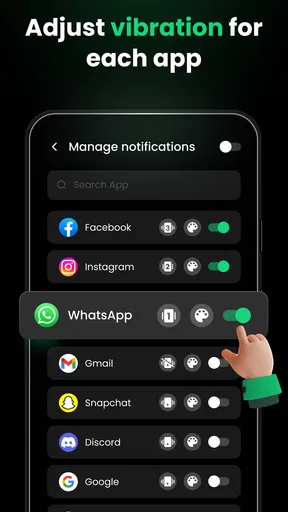
Selecting which phone apps can send alerts to the watch is more than a convenience. It is a way to protect attention and improve readability in practice. If every shopping reminder, group conversation, and work message lands on the wrist, the signal becomes noise. I’d start with the few apps whose alerts are time-sensitive, use the setup for a day, and only then add more. That simple trial makes it easier to spot whether a missed alert is caused by a setting or by an unreliable connection.
The app has a 4.2 average from around 42,000 ratings, and it has passed 10 million installs. Those figures suggest that many people have tried it, but they cannot tell me whether it will suit a particular watch-phone combination or personal routine. I’d treat them as context, not a guarantee of a seamless pairing.
Motor and sensory considerations
For someone with limited dexterity, avoiding repeated phone handling can be a real practical benefit. A glance at the wrist may be easier than reaching into a pocket, unlocking a screen, and navigating to a message. It can also reduce the number of deliberate phone interactions during a task. That said, the watch still needs to be worn, charged, and connected, and tiny screens can be difficult to read or operate for some people. I would not assume that notification syncing alone makes a device accessible for every user.
Sensory preferences differ, too. A wrist alert can be less disruptive than a phone ringing across a room, but repeated vibrations may be distracting or uncomfortable. Filtering incoming apps is therefore a useful first step: keep only alerts that matter, and assess how the watch feels in ordinary use before depending on it. Anyone sensitive to vibration or visual interruptions may prefer a quieter notification setup or rely on the phone’s own controls instead.
There is a trade-off between awareness and interruption. The watch can make a message harder to miss, but it can also bring work or social demands into moments when the phone would otherwise stay unnoticed. I’d use app selection as a boundary-setting tool, not just a way to mirror everything. For example, keeping personal calls visible while muting low-priority work alerts outside working hours may make the wrist genuinely helpful rather than constantly demanding attention.
Using it in everyday situations
Picture a commute where I’m standing on a crowded train with one hand on a rail and my phone safely tucked away. A glance at the watch can show that an alert arrived, helping me decide whether it merits finding space to take out the phone. The same workflow suits a parent carrying bags or someone doing a task that makes frequent phone checks awkward. It is not a substitute for reading a long message, but it can help me choose the right moment to do so.
For a more reliable routine, I’d test the connection at home before leaving. Send a few ordinary notifications, check that the watch receives the ones I selected, then repeat after moving the phone into the bag or pocket where it will normally stay. If alerts stop, checking the pairing before changing every notification setting can save time. The reported occasional disconnects make this small check worthwhile, particularly before a commute, appointment, or shift when missing a message would matter.
Watch Sync is free to install and rated for Everyone, with in-app purchases listed from $9.99 to $49.99 per item. I’d begin with the basic syncing use and decide whether the app fits my routine before spending anything. The presence of purchases does not by itself show which functions a particular user will need, so I would review the choices inside the app rather than assume that paid options are necessary for ordinary notification delivery.
How it compares with the usual options
Many smartwatch owners already receive phone notifications through their watch’s built-in connection or companion software. If that arrangement is stable and lets you choose the alerts you want, adding another app may create an extra setup step without solving a real problem. I would first check whether the watch and phone already handle the notifications you care about. A separate syncing app makes more sense when the existing route is awkward or when you specifically want a straightforward way to bridge phone alerts to a Wear OS watch.
Compared with checking the phone directly, a watch can make incoming alerts more accessible at a glance, but it offers less room to read and act. Compared with silence or a phone left in another room, syncing provides more awareness, though at the cost of more interruptions on the wrist. The best choice depends on the task: for urgent calls while moving around, wrist alerts may be useful; for concentrated work or a quiet evening, fewer notifications—or none—may be better.
Watch Sync is a communication app released on July 24, 2023. That context is useful when weighing it against the tools already bundled with a phone or watch: I would judge it by how well it fits the devices I actually use, not by expecting it to replace every built-in feature. The developer is AceTools Team, and the app’s purpose is narrow enough that a quick real-world test should make its value clear.
What to check before relying on it
Before I depend on the watch for anything time-sensitive, I’d check the connection and notification choices in the places I actually use my phone, not just while both devices are nearby at home. I’d also keep the phone available as a backup and notice whether wrist alerts remain comfortable through a full day. Those checks help clarify when the setup is useful—and when its limits matter more.
Connectivity and practical limits
The main friction is the same one that can undermine any Bluetooth-based notification workflow: a connection can drop, and a watch that has disconnected cannot serve as a dependable alert surface. The original experience included occasional disconnections that required manual reconnection. I would keep that limitation in mind if a notification is safety-critical or time-sensitive. For those situations, the phone itself should remain the dependable source, with the watch treated as a convenience rather than the only channel.
Battery expectations deserve a realistic approach as well. The original experience did not reveal a noticeable drain, but battery use varies with devices, settings, and how often the watch and phone communicate. I’d compare a normal day with the app active against my usual routine instead of assuming that every setup behaves identically. If battery life changes noticeably, trimming the number of apps allowed to send alerts is a sensible first adjustment.
Another useful habit is to avoid troubleshooting several things at once. If an alert does not arrive, first check whether the phone received it, then whether the watch remains connected, and finally whether that app is among the selected notifications. This sequence separates a phone-side issue from a pairing problem or a filter choice. It is a small diagnostic routine, but it can prevent unnecessary re-pairing and help identify whether the problem is occasional or recurring.
When another approach is better
I would skip this app if the phone’s existing watch integration already delivers the right alerts reliably, or if I do not want phone notifications appearing on my wrist at all. It is also a poor fit for someone who expects a watch to provide a complete alternative to a phone. Small displays are not ideal for extended reading, and syncing alerts does not remove the need to handle the phone for more involved tasks.
People who need dependable alerts for a critical responsibility should test the setup repeatedly in the environment where they plan to use it and keep another way to notice important calls or messages. A pairing that works at home may not be enough evidence for relying on it during a demanding day. If reconnections become frequent, using the watch’s standard companion route or simply keeping the phone accessible may be less frustrating.
For users with visual or motor needs, the right answer depends on the actual watch display, fit, controls, and alert style. Notification syncing may reduce phone handling, but it does not guarantee that text will be legible or that wrist interactions will be comfortable. I’d try a small set of essential alerts first and judge the whole experience—seeing, feeling, and dismissing them—rather than focusing only on whether an alert arrives.
A measured recommendation
In my view, this app is most appealing to someone who owns a Wear OS smartwatch, often misses phone alerts, and wants a simple way to pass selected notifications to the wrist. Its strongest practical benefit is not that it makes a watch smarter in every respect; it is that it can make a phone alert easier to notice at moments when reaching for the handset is inconvenient. The filtering option is especially important because it lets the watch serve as a deliberate signal rather than a second stream of every interruption.
I would approach it as a small, testable improvement to a routine. Start with a few important apps, confirm the pairing in the places where the phone is usually kept, and keep an eye on both connection reliability and how intrusive the alerts feel. If that trial makes daily tasks smoother, the app has earned its place. If the connection needs constant attention or the wrist notifications become distracting, the phone’s existing settings—or fewer alerts overall—may be the better choice.
Setup and first impressions
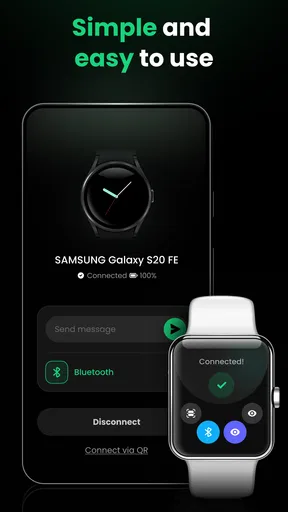
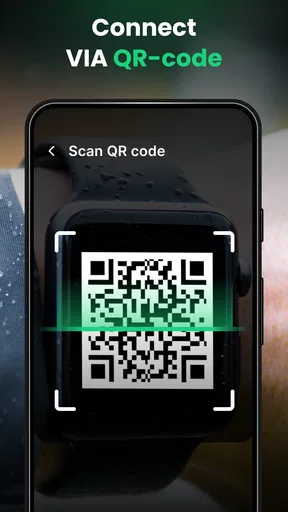
Getting started with the Watch Sync App - BT Notifier was surprisingly simple. The app is available for both Android and iOS, making it accessible for most smartphone users. After a quick download, I was ready to connect my smartwatch. The interface is pretty straightforward, with clear instructions guiding you through the pairing process. In about five minutes, I had my smartwatch and phone talking like lifelong friends.
Features That Stand Out
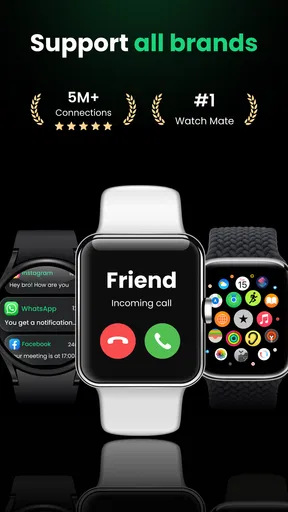
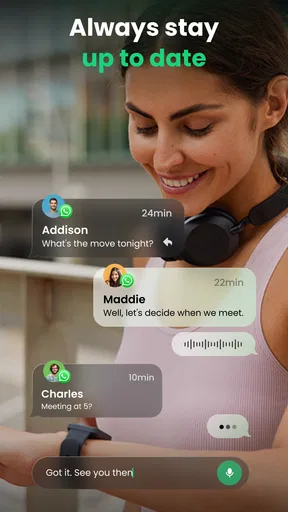
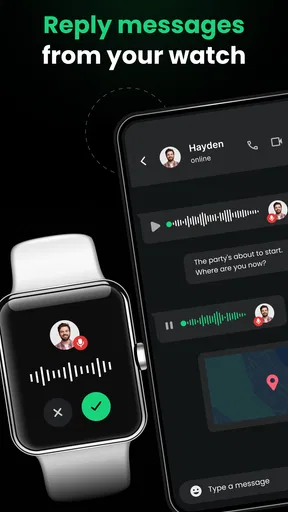
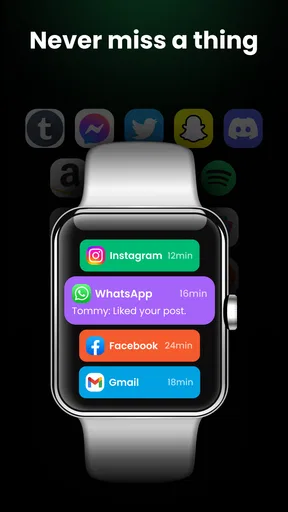
The app’s main feature is its ability to push notifications from your phone to your smartwatch. And let me tell you, it does this quite well. Whether it’s messages, calls, or app alerts, everything gets synced almost instantaneously. For someone like me who constantly misses alerts, this feature is a lifesaver.
Another cool feature is the customizable notifications. You can choose which apps you want to receive alerts from, ensuring you’re not bombarded with unnecessary pings. I found this particularly handy for filtering out work emails during weekends. Because, let’s face it, we all need a break sometimes!
Performance and Usability
Performance-wise, the app works seamlessly in the background without draining my phone’s battery, which was a pleasant surprise. I was worried about the Bluetooth connection affecting battery life, but it seems the developers have optimized it quite well.
Usability is where this app really shines. The user interface is intuitive and user-friendly. Even if you’re not tech-savvy, you’ll find it easy to navigate through the settings. The app also provides regular updates, which means you’ll always have the latest features and security enhancements.
Any Drawbacks?
No app is perfect, and the Watch Sync App - BT Notifier is no exception. One minor hiccup I encountered was occasional connectivity issues. Sometimes, the smartwatch would disconnect from the phone, requiring a manual reconnection. However, this didn’t happen too often and was more of a mild annoyance than a dealbreaker.
Also, while the app is free to download, there are in-app purchases for premium features. If you’re someone who loves full functionality, you might find yourself reaching for your wallet. But for basic syncing, the free version works just fine.
Final Thoughts
Overall, the Watch Sync App - BT Notifier does a commendable job of bridging the gap between your smartphone and smartwatch. It’s a handy tool for those who want to stay connected without constantly checking their phones. While it has a few quirks, the app’s strengths far outweigh its weaknesses.
So, if you’re tired of missing notifications and want a simple solution to keep you in the loop, give this app a try. It might just become your new favorite companion!
Verdict
Strengths of Watch Sync App - BT Notifier
- Seamless watch-phone notifications sync.
- User-friendly interface for quick setup.
- Customizable alert settings.
- Low battery consumption.
- Supports multiple languages.
Limitations of Watch Sync App - BT Notifier
- Limited compatibility with older devices.
- Occasional connectivity drops.
- Ads can be intrusive at times.
- Premium features require subscription.
- No offline functionality.
Other Releases by AceTools Team
View All
Open Chat - AI bot app
Productivity4.6

Control Center:Theme,wallpaper
Personalization4.8
Similar Picks in This Category
View All
Google Messages
Google LLC4.6

Gmail
Google LLC4.1

Google Meet
Google LLC4.4

Google Chrome
Google LLC4.1

WhatsApp Messenger
WhatsApp LLC4.6

Carrier Services
Google LLC4.2
Frequently Asked Questions
What is the purpose of the Watch Sync App - BT Notifier?
The Watch Sync App - BT Notifier is designed to seamlessly connect your smartphone with your smartwatch via Bluetooth. It enables notifications, messages, and call alerts from your phone to appear on your watch. This functionality ensures you stay updated without needing to constantly check your phone.
Is the Watch Sync App compatible with all smartwatches and smartphones?
The app is compatible with most Android and iOS devices, but it's essential to check the compatibility list on the app's download page. Some older smartwatch models or specific phone brands may not support all features, so reviewing compatibility before downloading is advised.
Does the Watch Sync App affect battery life on my devices?
Using the Watch Sync App may affect battery life on both your smartphone and smartwatch due to continuous Bluetooth connectivity. However, the app is optimized to minimize battery consumption. Adjusting notification settings can help manage and extend battery performance effectively.
Are there any privacy concerns with using the Watch Sync App?
The Watch Sync App requires access to notifications and contacts to function correctly. The app prioritizes user privacy by not storing personal data on external servers. Always download from official app stores to avoid malicious versions that might compromise security.
How can I troubleshoot connection issues with the Watch Sync App?
If you experience connection issues, ensure Bluetooth is enabled on both devices and they are within range. Restarting both devices can help. Also, check for app updates and ensure both devices run the latest software versions. Consult the app’s support resources for additional assistance.
